

Sanvador Store Locator
Show customers your nearest store, dealer or service point, and whether it is open right now.
Features
Free
- Unlimited locationsStores, dealers, service points, branches or offices
- Opening hours and “Open now”Lunch breaks, 24 hours, after-midnight closing, per-location time zone
- Near me searchAddress, district or postcode, sorted by distance with a radius filter
- Map without an API keyOpenStreetMap with clustered, colour-coded pins
- Call, WhatsApp, directions and ShareSend a location by WhatsApp, email or text in one tap
- Click the map to filter the listA cluster or pin lists just those locations
- Start screen for long listsVisitors choose an area or use their location first
- Phone number on computersShown on the card, copied with one click
- Categories and custom fieldsFilter chips, pin colours and your own fields
- CSV and Excel import and exportWith a test run before saving
- Setup wizard with sector templatesWording and fields ready for your business
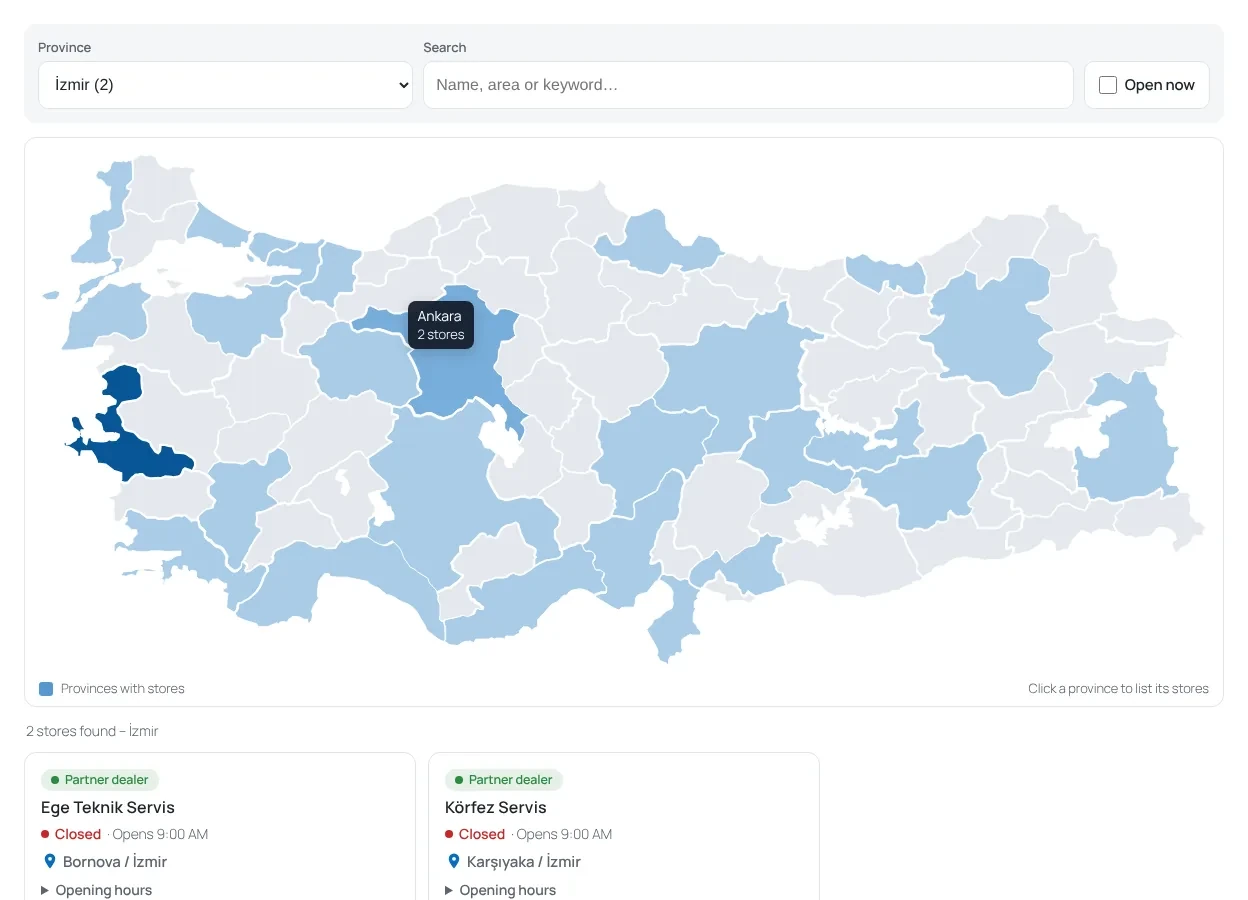
- Türkiye province mapClickable map of all 81 provinces
- GDPR / KVKK consent optionNothing loads from outside until the visitor agrees
- Block and shortcodeWorks with any theme and most page builders
Pro Everything in Free, plus
- A Google-ready page for every locationLocalBusiness schema, nearby locations and XML sitemap
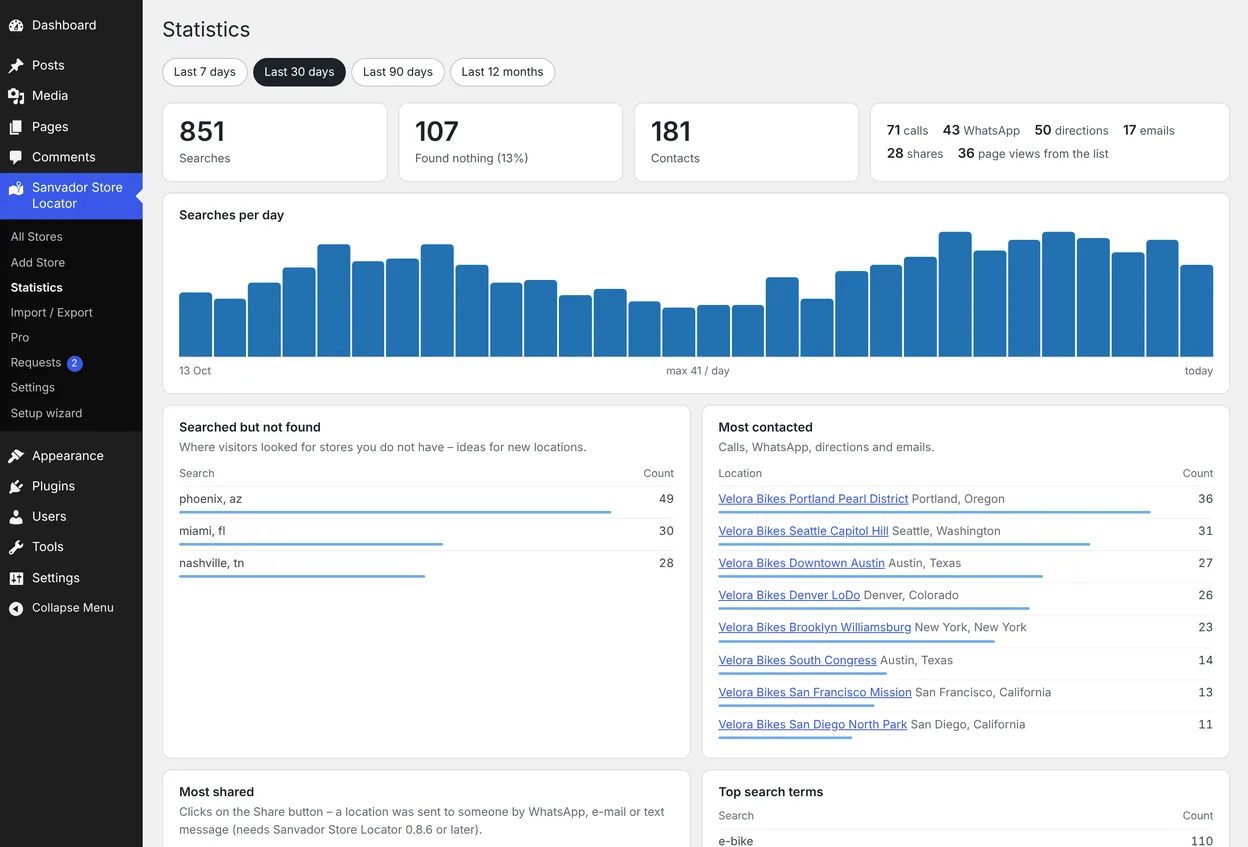
- Search analyticsWhat visitors look for, what they could not find, and which locations get calls and shares
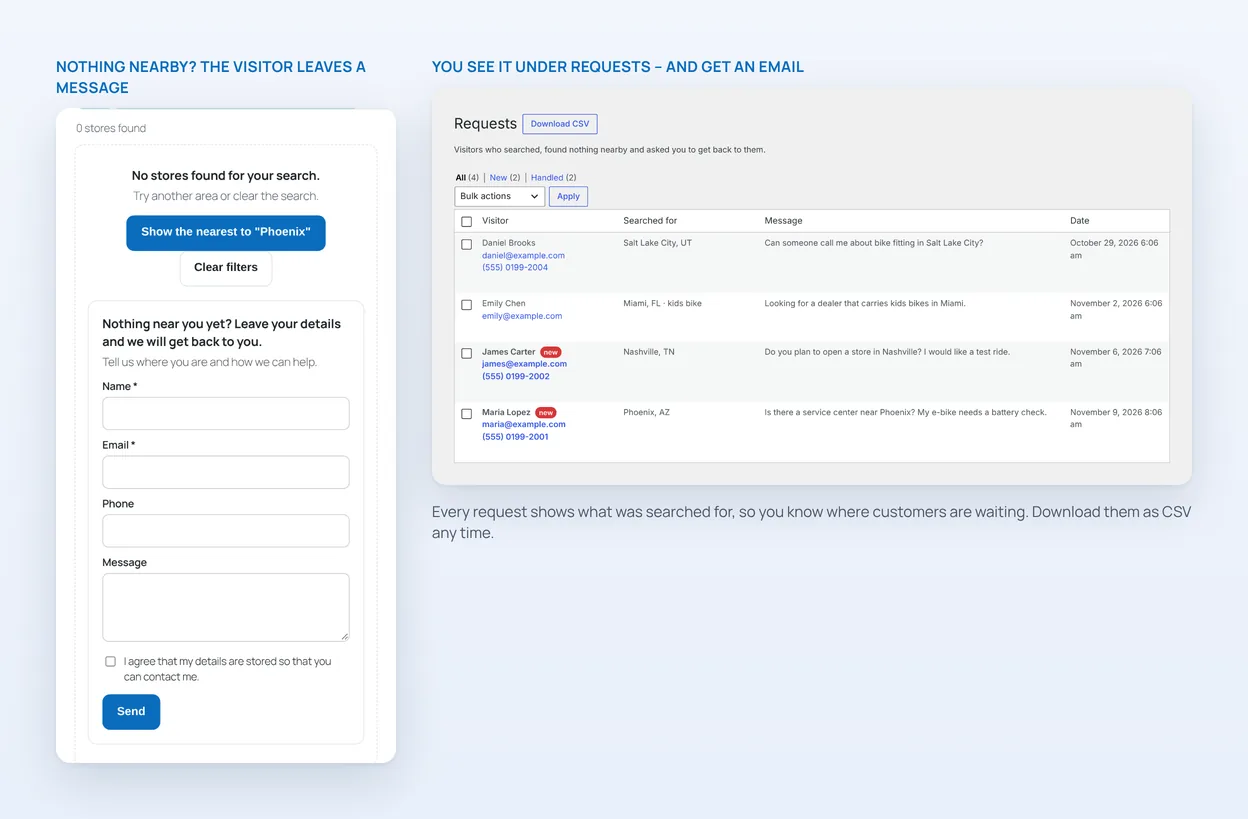
- Contact form when nothing is nearbyEmail alerts, Requests list and CSV export
- Your own share messageAdd an intro line and signature to every shared location
- SEO plugin supportYoast SEO, Rank Math and All in One SEO
- Automatic updatesPlus new Pro features such as Google Sheets sync and a dealer sign-up form
A store, dealer and service-point locator that answers “is it open?”
Sanvador Store Locator adds a fast locator to any WordPress site. Visitors search by name or address, filter by distance, see opening hours, and call, message, share or get directions in one tap. It works for dealers, service points, stores, branches, clinics, offices, restaurants and schools.
Opening hours and “Open now”
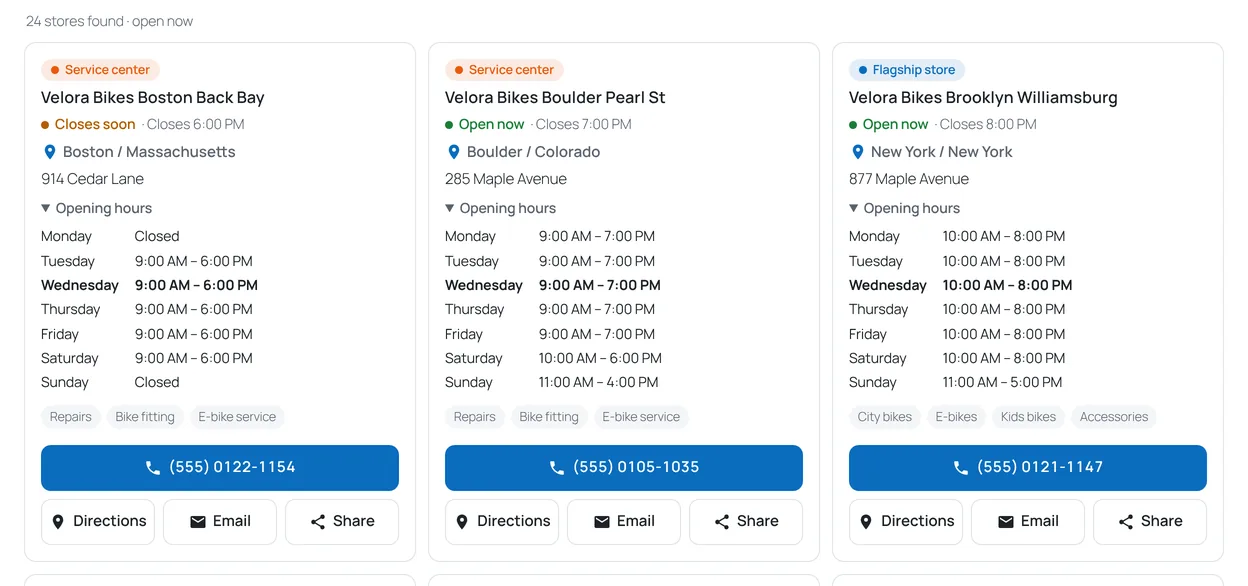
Enter weekly hours once per location, with lunch breaks, 24-hour days or closing after midnight, or import them from a spreadsheet. Each card shows “Open now · Closes 6:00 PM”, “Closes soon” in the last hour and “Opens Mon 9:00” when closed, in each location’s own time zone.
Near me, in one step
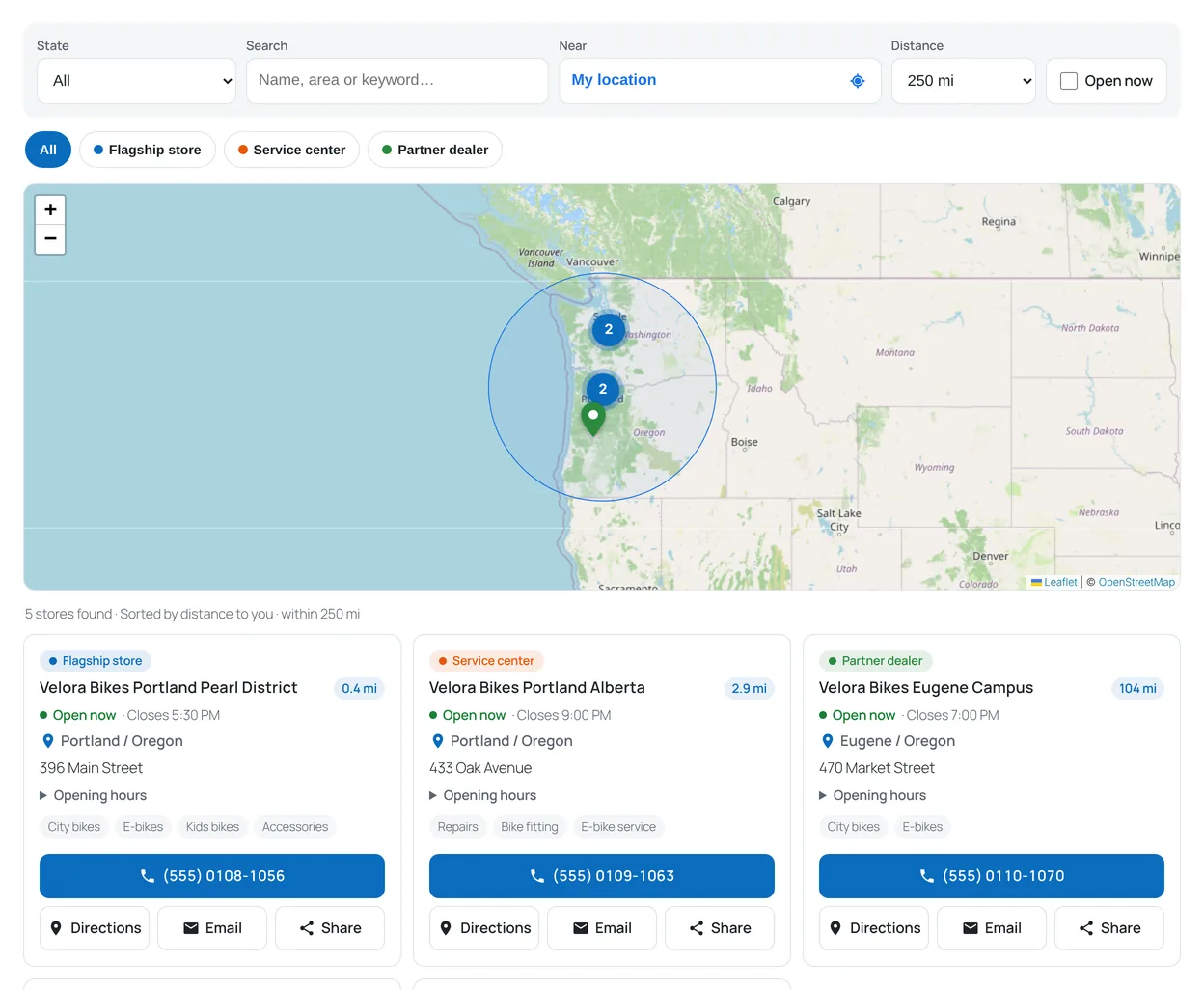
Visitors type a street, district or postcode, or share their location. Results sort by distance and a 5–250 km (or mile) filter draws its radius on the map. Address lookups go through your own site and are cached.
Click the map, see just those locations
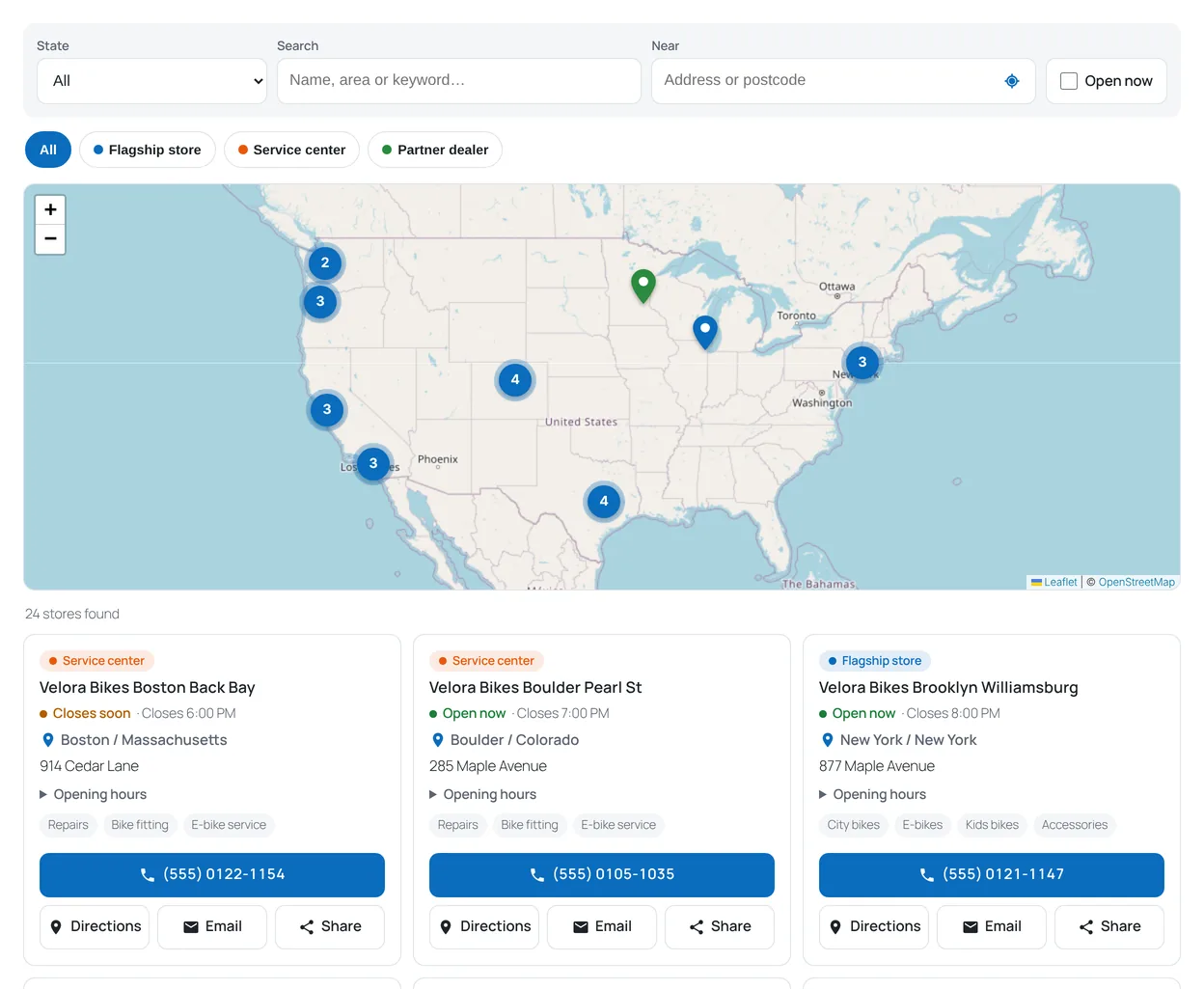
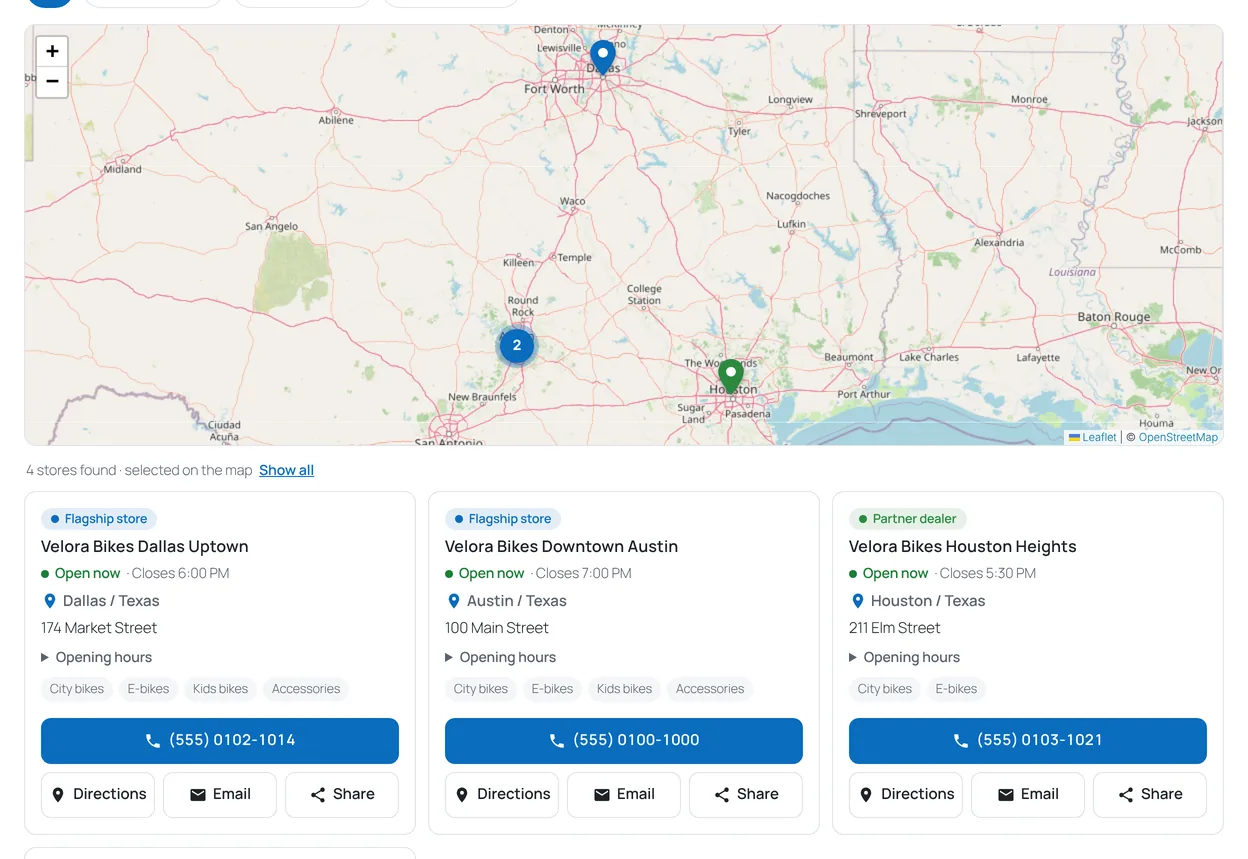
Click a cluster or a pin and the list below shows only those locations, while the map keeps showing everything. “Show all” brings the full list back, and any other filter clears the selection.
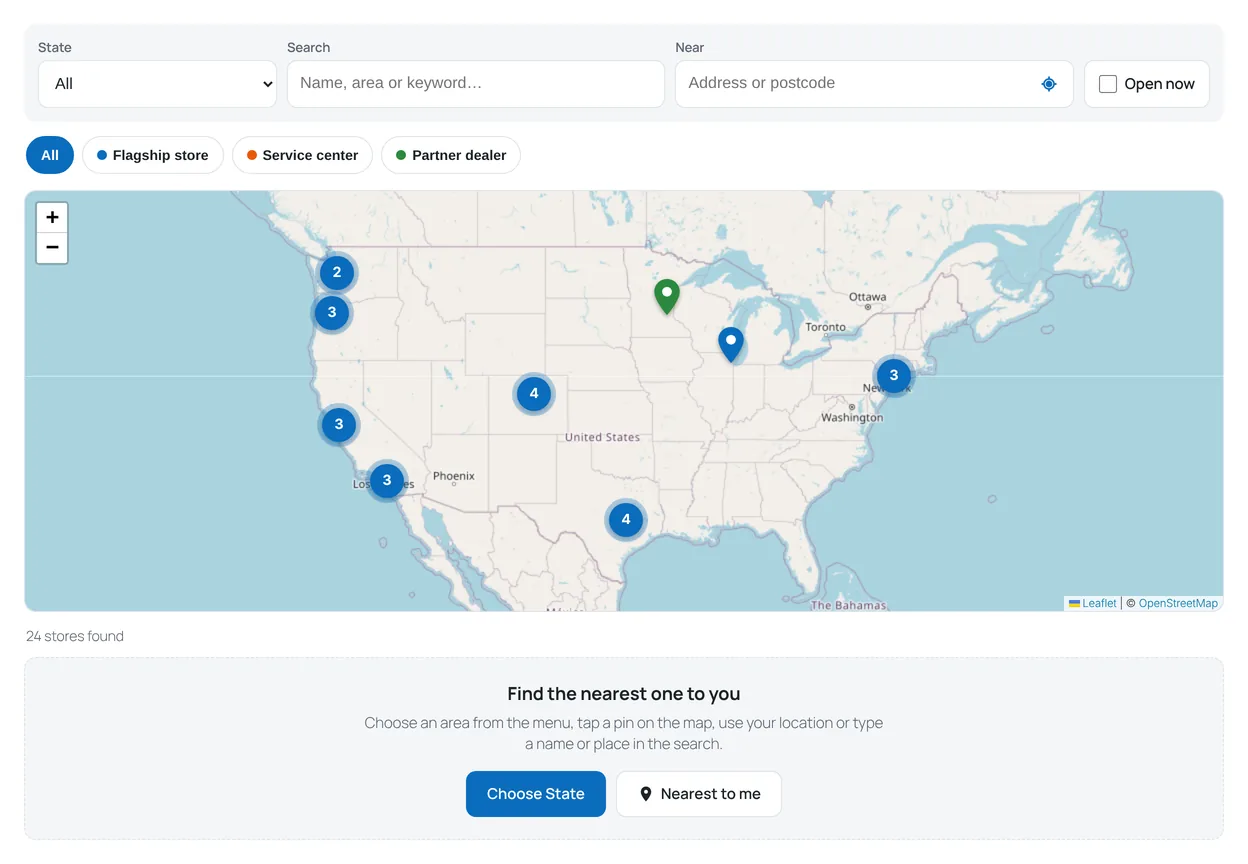
Long list? Ask visitors where they are first
With a hundred locations, the first six in the list are rarely the right ones. Turn on the start screen and visitors first choose an area, tap a pin or use their location – the list appears only when it is useful. The map still shows every location from the start.
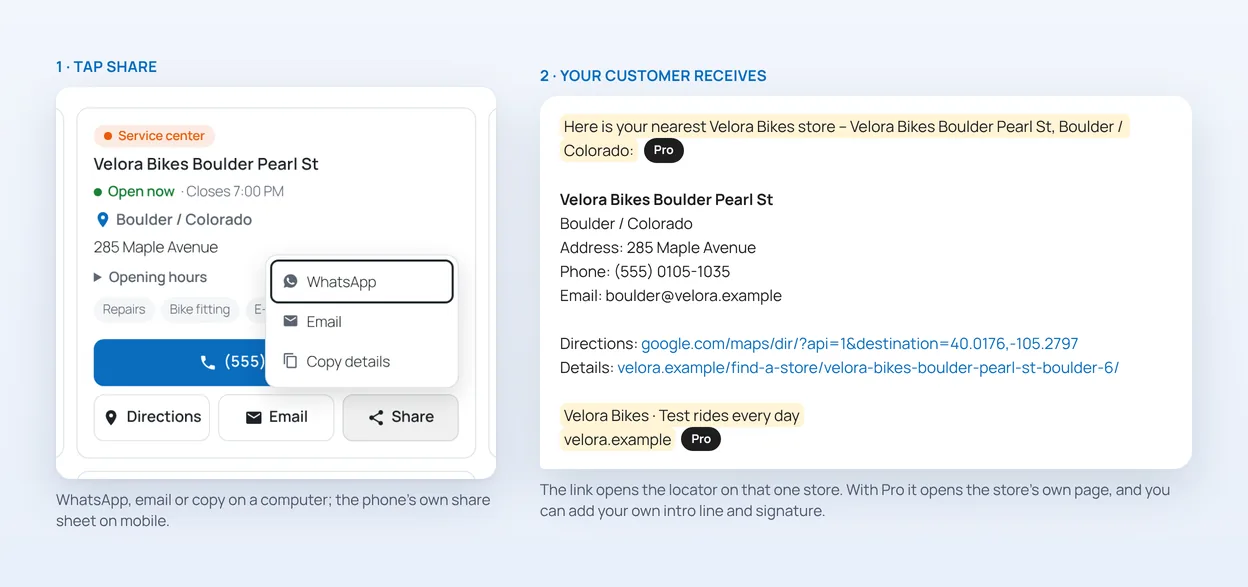
Share a location in one tap
A customer calls from another city and asks for the nearest dealer? Press Share on the card and send the name, address, phone, directions and a link by WhatsApp, email or text. On phones it opens the phone’s own share menu. The link opens your locator on that one location – or, with Pro, its own page. Pro also lets you add your own intro line and signature to every message.
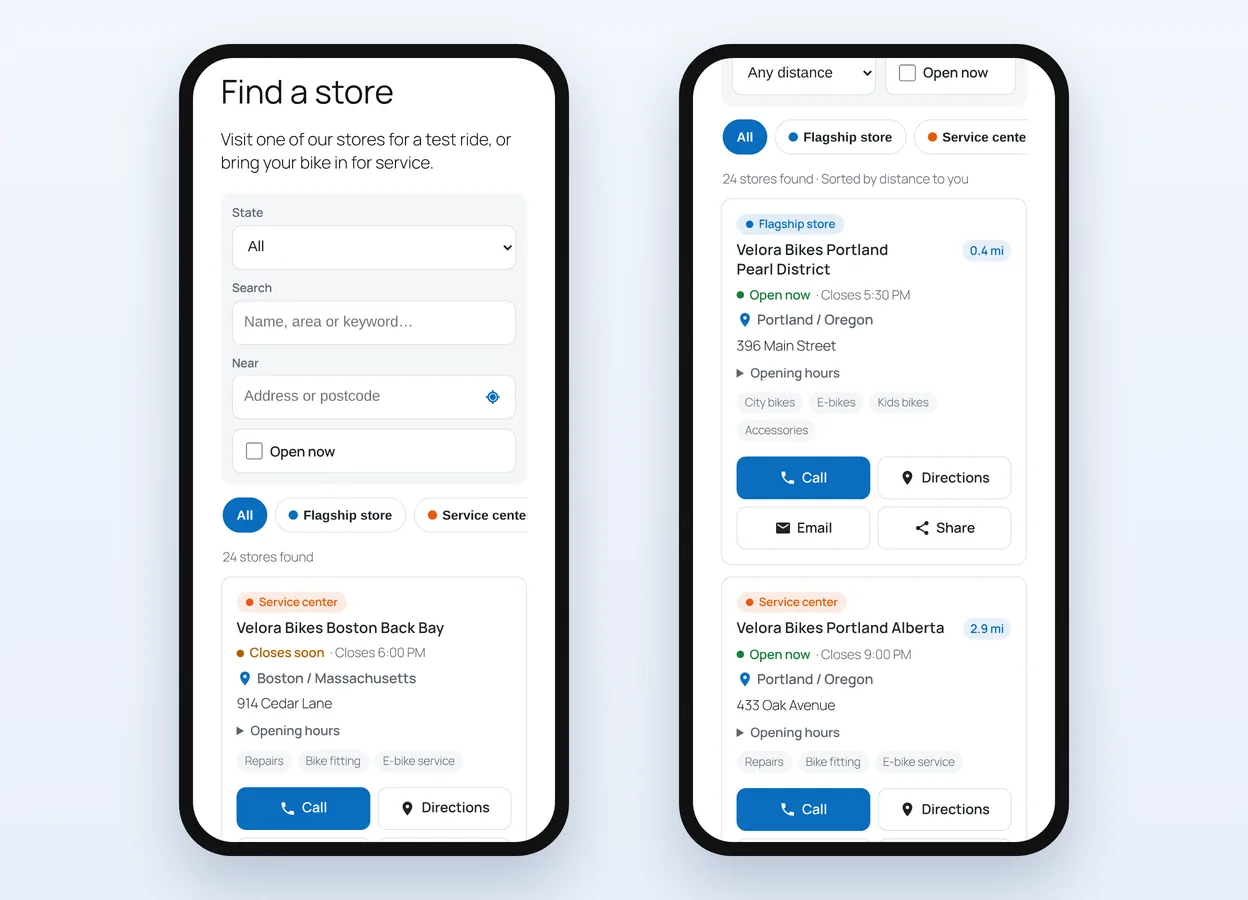
Built for phones – and for desks
Most locator visits happen on a phone, so filters stack, buttons are large and Call, Directions, Email and Share are on every card. On a computer, where nobody can tap to call, the card shows the phone number itself – one click copies it.
For Turkish websites: a clickable map of all 81 provinces
Optional for sites in Türkiye. Provinces with locations light up and a click lists them. It needs no coordinates and loads nothing from outside.
The free version is in the official WordPress plugin directory: download it from WordPress.org. If it helps your business, please rate it on WordPress.org – a short review helps other site owners find it.
Pro: turn locator visits into customers
Sanvador Store Locator Pro adds what the free plugin leaves out on purpose: pages that bring visitors in from Google, numbers that show where you are missing, and a way to reach visitors who found nothing nearby.
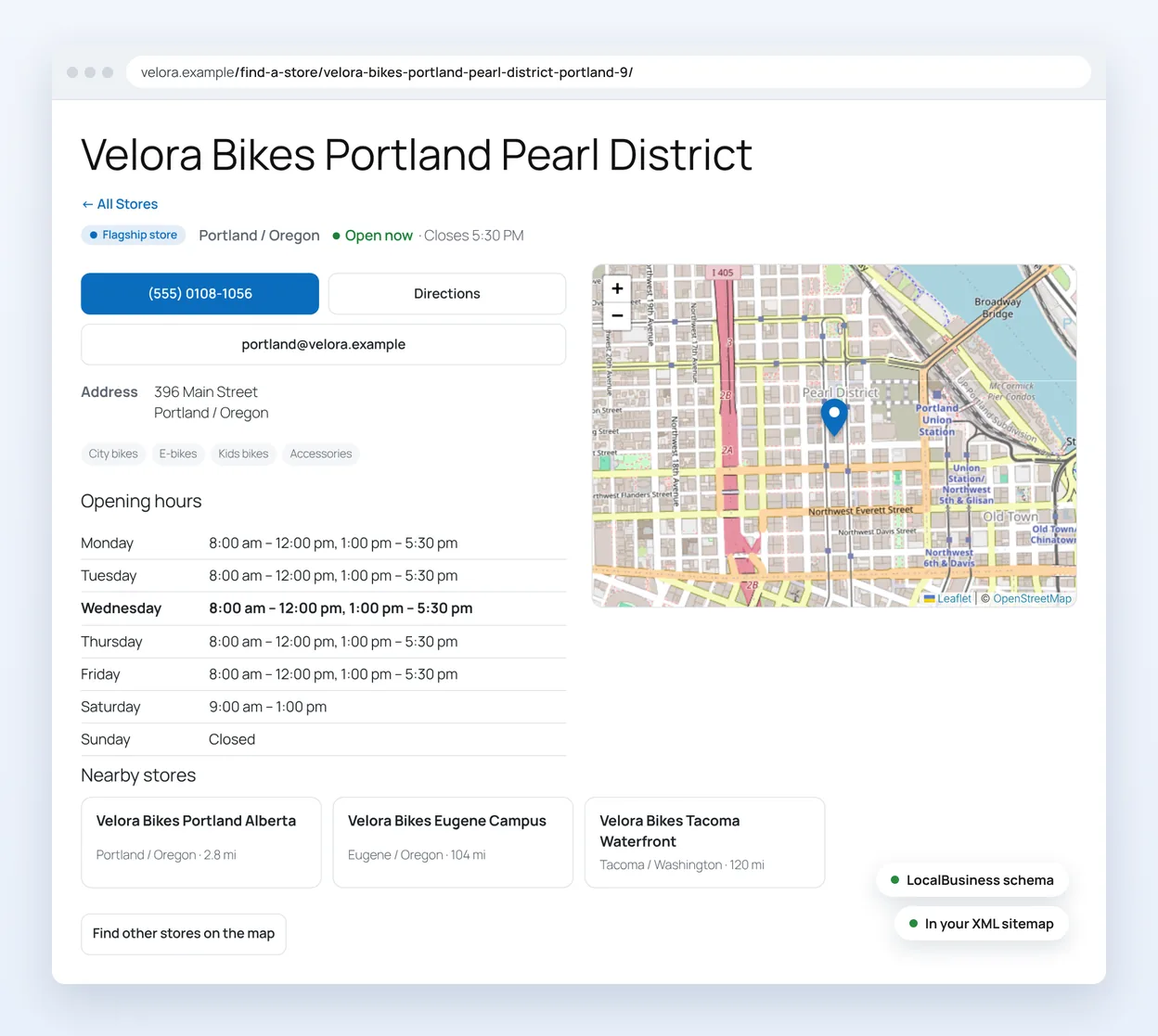
A page for every location that Google can find
Each location gets its own address under your locator page, with the map, opening hours, contact buttons and nearby locations. LocalBusiness schema, breadcrumbs and an XML sitemap entry are added for you, and titles and descriptions work with Yoast SEO, Rank Math and All in One SEO. Google gets a real page it can show for searches like “bike shop Pearl District”, instead of one locator page for every place.
See what visitors look for – and where you are missing
Statistics show how many people searched, how many found nothing, and where they looked. “Searched but not found” is a ready-made list of places to open next. You also see which locations get the most calls, WhatsApp messages, directions and shares. No IP addresses or cookies are stored, and data older than 13 months is deleted.
Keep the visitors who found nothing nearby
When a search comes back empty, a short form asks the visitor to leave their details. You get an email, and every request is listed under Requests with what they searched for. Mark them as handled or download them as CSV. Spam protection works without a captcha, and the form works with WordPress’s personal data tools.
Live in about ten minutes
- Install and answer two questions: what you list, and where (the whole world, one country or one city). The wizard prepares the wording, categories and fields for your sector.
- Add your locations: type them in or import an Excel/CSV file. A test run shows what will happen before anything is saved.
- Place the block: add the Sanvador Store Locator block or the
[sanvador_store_locator]shortcode to any page.
Frequently asked questions
Do I need a Google Maps API key?
No. The map uses OpenStreetMap and the map library ships with the plugin. You can switch to another tile provider in the map settings if your site gets a lot of traffic.
How do I bring in my existing list?
Save your spreadsheet as CSV from Excel and upload it. Headers in English, Turkish and several other languages are recognised, categories are created for you, and a test run shows the result before saving.
Which time zone does “Open now” use?
Each location’s country time zone. For countries with several zones, such as the USA, you can choose the zone per location.
Is it GDPR / KVKK friendly?
Turn on the consent option and the map loads nothing from outside servers until the visitor clicks “Show map”. Address searches go through your own site, so the visitor’s IP address is not passed on. Pro statistics store no IP addresses or cookies.
Does it work with my theme and page builder?
Sanvador Store Locator is a block and a shortcode ([sanvador_store_locator]), so it works in the block editor, classic themes and page builders that accept shortcodes.
Do I need Pro?
No. Everything a visitor needs to find and contact a location is free: search, map, opening hours, near me, sharing and the start screen. Pro is for the site owner: location pages for Google, statistics and the contact form for visitors who found nothing.
I use an earlier version under another name. How do I upgrade?
Earlier versions were called Locatory and, before that, Service Finder. Keep the old plugin installed, then install and activate Sanvador Store Locator: the old copy is switched off and your locations, settings, categories and fields move over. Pages with the old shortcode or block and links shared earlier keep working. Then delete the old plugin.
Pricing
Founding price: 40% off for the first 100 customers until February 12, 2027. The discount is applied at checkout and stays when you renew.
Single site
1 website
$49/ year
$149once
Updates and support for 1 year. Renews yearly, cancel anytime.
Pay once. Lifetime updates and support.
5 sites
5 websites
$99/ year
$299once
Updates and support for 1 year. Renews yearly, cancel anytime.
Pay once. Lifetime updates and support.
20 sites
20 websites
$199/ year
$599once
Updates and support for 1 year. Renews yearly, cancel anytime.
Pay once. Lifetime updates and support.
- 14-day money-back guarantee
- Secure checkout by Freemius
- VAT and sales tax handled automatically
Documentation
Installation, settings and frequently asked questions.